 Gmail One-Click Cleaner
Gmail One-Click Cleaner
Bulk delete old emails and big attachments and unsubscribe from the lists filling up your inbox. Any cleanup can be undone with a single click. Everything happens inside your browser, so nothing about your mail leaves it.
It's free with no account needed and the Pro version is an optional $9.99 paid once.
What it does
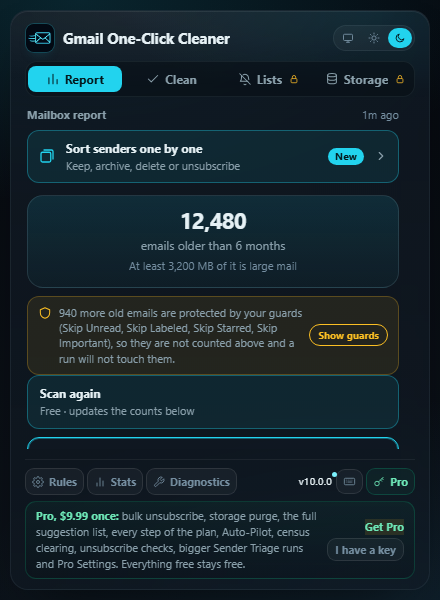
Start with the free Mailbox Report
A read-only scan counts old promos, forgotten newsletters, large attachments and mail that has sat in your inbox for years, then puts the step that clears the most at the top.
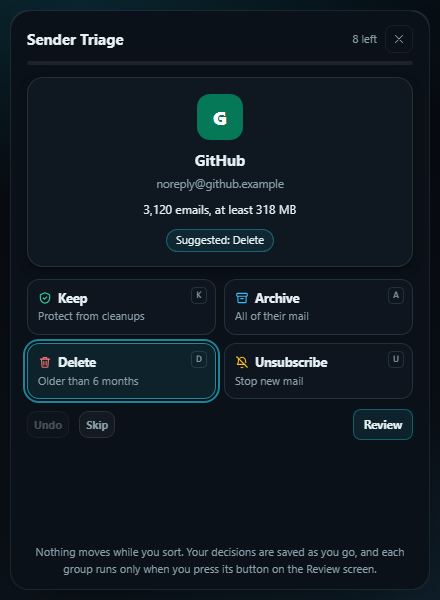
Sort senders one by one New
Sender Triage shows the senders your scans found one card at a time with the biggest first. You decide to keep, archive, delete or unsubscribe each, with nothing moving until you run a group.
Bulk delete old mail
Clear old Promotions, Social, Updates and Forums mail along with newsletters and no-reply senders, thousands at a time instead of 50.
See what is eating your storage
The Storage X-ray ranks senders by space used. Each message counts at the smallest size of its tier, so a figure of at least 2 GB means at least 2 GB.
Unsubscribe, then check it worked
Unsubscribing uses Gmail's own unsubscribe control. A search per sender two weeks later checks if they stopped sending (Pro).
Undo anything
Every run labels mail before moving it; on the Stats page, Restore brings back an entire run. Deleted mail sits in Trash for roughly 30 days before Gmail clears it out.
Private by design
There are no servers on our end for your mail to go to.
- Everything the extension does happens right in your own Gmail tab
- No analytics or tracking at all, and no account to sign up for
- Your Pro key is checked on your device, and the extension never calls home
- Erase Stored Sender Data clears every sender list the scans keep, with one click
Pro, if you want it
Pro costs $9.99 one time and comes with a 30-day money-back guarantee. It adds the bulk versions of the free tools: bulk unsubscribe, the storage purge, every step in the report plan, the full suggestion list, Auto-Pilot and bigger Sender Triage runs. Everything that's free remains free.
Questions people ask
- Why hasn't my storage gone down after deleting emails?
- Gmail keeps deleted mail in Trash, which counts against your storage until it empties, about 30 days later or sooner if you empty it yourself. The extension shows how much is waiting and can open Trash for you. That same window is what makes one-click Restore possible.
- Is my email sent anywhere?
- No. Everything happens in your browser. The extension makes no network requests of its own and collects no information about you or your email.
- Which browsers does it support?
- Chrome, Edge, Brave, and other Chromium-based browsers, as well as Firefox.
Something else? The support page has the usual fixes and a way to reach me.